
Help
Amharic Teacher helps anyone learn the basics of the Amharic language.
AmharicTeacher iPhone App — Help
Contact us
Email [email protected] for app support or privacy requests.
For technical problems, include your iPhone model, iOS version, app version and a description of what happened. Never send your password or payment-card details.
Do I need an account?
No. You can learn and purchase AmharicTeacher Plus as a guest.
Signing in lets us connect eligible purchases and recognize existing paid website access. Your learning progress stays on your device; signing in does not currently sync progress between devices.
How do I restore my purchase?
Open Account → Restore App Store purchase while using the Apple Account that made the purchase.
You can also sign in to AmharicTeacher to connect an eligible purchase to your AmharicTeacher account. If you see an account-linking conflict, contact us.
How does the free trial work?
Eligible subscriptions offer a 3-day free trial when shown in Apple’s purchase confirmation. That confirmation shows the price and billing period that apply after the trial.
Subscriptions renew automatically unless cancelled. To avoid being charged after a free trial, cancel at least 24 hours before it ends. Lifetime purchases do not include a subscription trial.
How do I cancel my subscription?
On your iPhone, open Settings → your name → Subscriptions → AmharicTeacher, then choose the cancellation option.
Deleting the app or your AmharicTeacher account does not cancel your subscription. App Store refund requests are handled by Apple at reportaproblem.apple.com.
For purchases made on our website, email us using the address associated with your website account.
How do I delete my account?
In the app, open Account → Delete account, confirm your identity and submit the request. Once accepted, you will be signed out.
Our team processes requests manually and completes deletion within 30 days. We remove or de-identify account information, except records needed for necessary legal, accounting or security purposes. Existing server backups expire within one month.
You can request deletion without waiting for an App Store subscription to expire. Remember to cancel your subscription separately if you no longer want it.
How do I remove my learning progress?
Learning progress is stored on your phone. Deleting your account does not erase it. Delete the app and its data to remove local progress. Device backups are managed separately through Apple.
How do I request access to or correction of my information?
Email [email protected]. We may need to verify your identity before completing an access, correction or deletion request.
Read our Privacy Policy and Terms of Service for more information.
How do I contact you?
You can send an email to  .
.
How do I play the sound on the lessons?
You simply click on the images or texts.What technology is required to use the site?
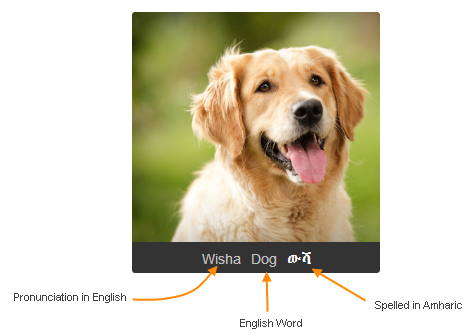
Any modern browser will work. We highly recommend Google Chrome, but Firefox or Safari will work just as well.How to interpret the vocabulary and alphabet lessons.
 Best,
Best, The Team at AmharicTeacher